Stop unapproved spend
No purchase order or supplier bill reaches your books until every required approver has signed off.
Route every purchase request, purchase order, and supplier bill through the right approvers, level by level, before it reaches your books. Included free for up to 5 users.
A multi-tier approval workflow sends a document through more than one approver before it’s accepted. A $500 purchase might only need the department manager. A $15,000 purchase might need the manager, then finance, then a director.
Each tier is a checkpoint. Small, routine spend moves quickly, while larger or riskier spend gets the scrutiny it deserves. Nothing reaches Xero or QuickBooks until every required level has signed off.
Xero’s built-in approval is a single step. ApprovalPro adds the missing layers, starting with the purchase request, before any money is committed.
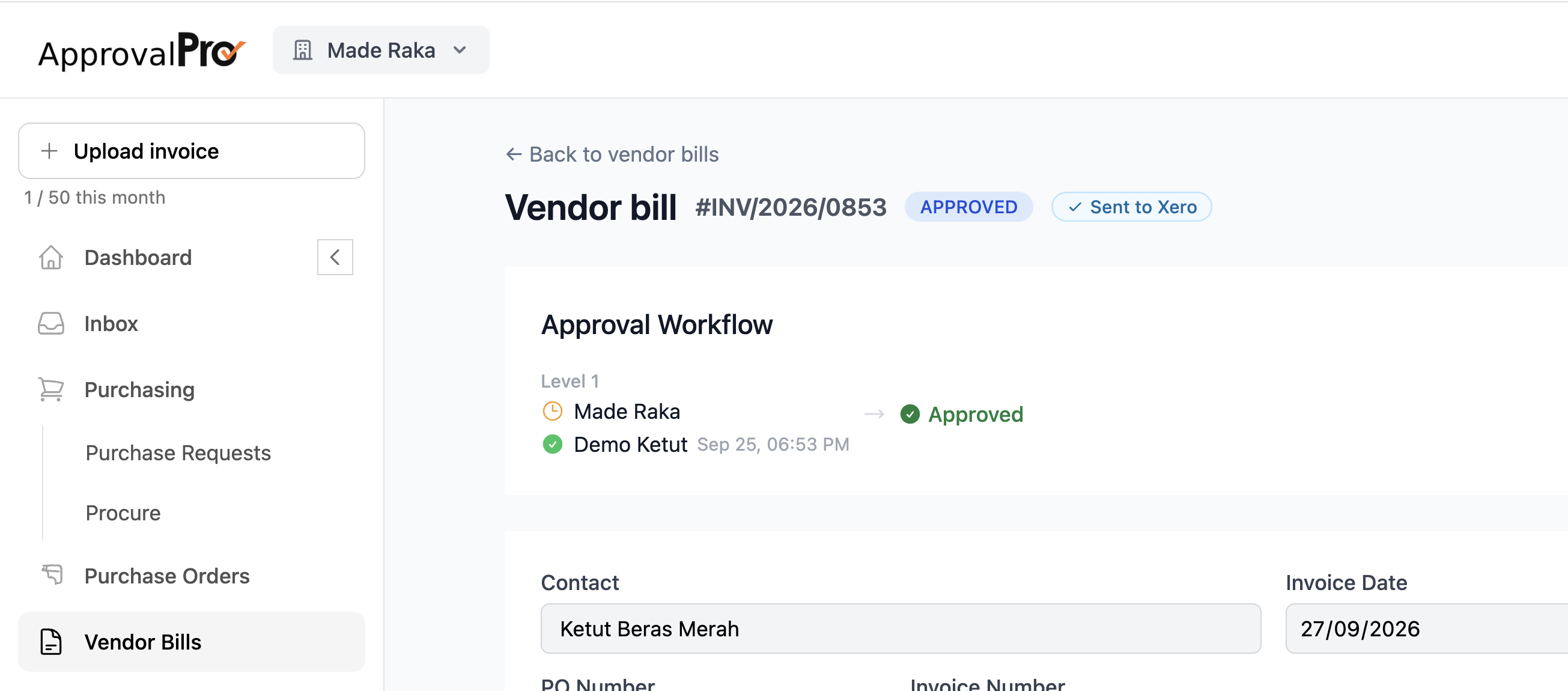
Set it up once. Every document follows the same path from submission to your books.
Staff raise a purchase request, or a purchase order or supplier bill arrives from Xero or QuickBooks.
The document goes to its first approver, usually the requester’s manager, who gets an email notification.
Once approved, it moves to the next level, such as finance or a director, until every required approver has signed off.
Fully approved documents sync to Xero or QuickBooks. Rejected ones stay on hold, with the reason logged.
Match the approval chain to the risk. Here’s a typical set of amount-based tiers:
| Purchase amount | Approval chain |
|---|---|
| Under $1,000 | Department manager |
| $1,000 – $10,000 | Department manager → Finance |
| Over $10,000 | Department manager → Finance → Director |
Example only. Set the thresholds and approvers that fit your organisation. You can also route by department (e.g. marketing spend goes to the marketing lead) or by document type (e.g. every PO needs procurement). Custom routing rules are part of the Flat Rate plan.
Choose how approvers work together at each level.
Approvers sign off one after another. The next approver only sees the document once the previous one has approved it.
Best for: escalating authority, such as manager then finance then director.
Several approvers review at the same time, so one busy person doesn’t hold up the rest of the chain.
Best for: cross-functional sign-off, such as IT and finance on a software purchase.
Watch a supplier bill move through multi-level approval chains, get checked against budget, and sync to Xero once every approver has signed off.
Want the full purchasing flow? See how a purchase request becomes an approved PO with budget control.
Xero lets a user with approval rights mark a bill as approved. That’s one step, after the spend has already happened.
| Capability | Xero built-in | ApprovalPro |
|---|---|---|
| Approval levels | Single step | Multi-tier, sequential or parallel |
| Approval before the spend | No purchase request step | Purchase requests and POs approved before ordering |
| Budget check | Not included | Every request checked against budget |
| Works with QuickBooks Online | Xero only | Xero and QuickBooks Online |
Proper controls without slowing your team down.
No purchase order or supplier bill reaches your books until every required approver has signed off.
Documents follow your approval hierarchy automatically, so nobody has to work out who to ask.
Approvers get an email the moment something needs them. No more chasing approvals in email and chat.
Every approval, rejection, and comment is time-stamped at every level. Know who approved what, and when.
Role-based access controls who can request, approve, and post, so no one person controls the whole process.
Documents flow in from Xero and QuickBooks for approval and post back automatically once approved.
A multi-tier approval workflow sends a document through more than one approver before it’s accepted. For example, a purchase request might need sign-off from a department manager and then from finance. Each tier adds a check, so larger or riskier spend gets more scrutiny.
Xero’s built-in approval is a single step: a user with approval rights marks a bill as approved. ApprovalPro adds multi-level approval chains on top of Xero, plus purchase requests, purchase orders, and a budget check on every request.
As many as your process needs. Most teams use two or three levels, such as manager, finance, and a director for larger amounts.
Yes. Each level can be sequential, where approvers sign off one after another, or parallel, where several approvers review at the same time.
Yes. The Free plan includes multi-tier approval for up to 5 users and 5 documents per month. Custom routing rules by amount, department, or document type are part of the Flat Rate plan at $49 per month.
Rejected documents stay on hold and never post to Xero or QuickBooks. Every approval, rejection, and comment is time-stamped in the audit trail.
Yes. ApprovalPro works with both Xero and QuickBooks Online. Documents flow in for approval and post back once every required level has signed off.